Vue源码解读(一)

前言

vue源码工程其实内容相当丰富,不仅包含了vue主体内容,其中工程的结构方法也都值得我们学习,所以这一系列内容打算对整个vue源码做一个解析。此处以2.2.0版本为例,进行分析。内容大概分为:

1.使用的主要插件或者工具简介(学习的前提)
2.文件目录结构介绍
3.代码执行流程介绍
4.observer, dep,watcher观察模式介绍
5.dom渲染介绍

##二、主要插件和工具

###1.npm
这个无需多言,项目中包含一个主要文件 package.json文件即证明其中要用到不少npm的包,查看其package.json文件可对项目用到的一些工具和包有个大概了解。(以2.2.0版本为例)

1
2
3
4
5
6
7
8
9
10
11
12
13
14
15
16
17
18
19
20
21
22
23
24
25
26
27
28
29
30
31
32
33
34
35
36
37
38
39
40
41
42
43
44
45
46
47
48
49
50
51
52
53
54
55
56
57
58
59
60
61
62
63
64
65
66
67
68
69
70
71
72
73
74
75
76
77
78
79
80
81
82
83
84
85
86
87
88
89
90
91
92
93
94
95
96
97
98
99
100
101
102
103
104
105
106
107
108
109
110
111
112
113
114
115
116
117
118
119
120
121
122
123
{
"name": "vue",
"version": "2.2.0",
"description": "Reactive, component-oriented view layer for modern web interfaces.",
"main": "dist/vue.runtime.common.js",
"module": "dist/vue.runtime.esm.js",
"unpkg": "dist/vue.js",
"typings": "types/index.d.ts",
"files": [
"dist/vue.js",
"dist/vue.min.js",
"dist/vue.runtime.js",
"dist/vue.runtime.min.js",
"dist/vue.common.js",
"dist/vue.runtime.common.js",
"src",
"types/index.d.ts",
"types/options.d.ts",
"types/plugin.d.ts",
"types/vnode.d.ts",
"types/vue.d.ts"
],
"scripts": {
"dev": "TARGET=web-full-dev rollup -w -c build/config.js",
"dev:cjs": "TARGET=web-runtime-cjs rollup -w -c build/config.js",
"dev:test": "karma start build/karma.dev.config.js",
"dev:ssr": "TARGET=web-server-renderer rollup -w -c build/config.js",
"dev:compiler": "TARGET=web-compiler rollup -w -c build/config.js",
"dev:weex": "TARGET=weex-framework rollup -w -c build/config.js",
"dev:weex:compiler": "TARGET=weex-compiler rollup -w -c build/config.js",
"build": "node build/build.js",
"build:ssr": "npm run build -- vue.runtime.common.js,vue-server-renderer",
"build:weex": "npm run build -- weex-vue-framework,weex-template-compiler",
"test": "npm run lint && flow check && npm run test:types && npm run test:cover && npm run test:e2e -- --env phantomjs && npm run test:ssr",
"test:unit": "karma start build/karma.unit.config.js",
"test:cover": "karma start build/karma.cover.config.js",
"test:e2e": "npm run build -- vue.min.js && node test/e2e/runner.js",
"test:weex": "npm run build:weex && jasmine JASMINE_CONFIG_PATH=test/weex/jasmine.json",
"test:ssr": "npm run build:ssr && jasmine JASMINE_CONFIG_PATH=test/ssr/jasmine.json",
"test:sauce": "npm run sauce -- 0 && npm run sauce -- 1 && npm run sauce -- 2",
"test:types": "tsc -p ./types/test/tsconfig.json",
"lint": "eslint src build test",
"flow": "flow check",
"sauce": "SAUCE=true karma start build/karma.sauce.config.js",
"bench:ssr": "npm run build:ssr && NODE_ENV=production node benchmarks/ssr/renderToString.js && NODE_ENV=production VUE_ENV=server node benchmarks/ssr/renderToStream.js",
"release": "bash build/release.sh",
"release:weex": "bash build/release-weex.sh",
"install:hooks": "ln -fs ../../build/git-hooks/pre-commit .git/hooks/pre-commit"
},
"repository": {
"type": "git",
"url": "git+https://github.com/vuejs/vue.git"
},
"keywords": [
"vue"
],
"author": "Evan You",
"license": "MIT",
"bugs": {
"url": "https://github.com/vuejs/vue/issues"
},
"homepage": "https://github.com/vuejs/vue#readme",
"devDependencies": {
"babel-core": "^6.9.0",
"babel-eslint": "^7.1.0",
"babel-helper-vue-jsx-merge-props": "^2.0.2",
"babel-loader": "^6.2.4",
"babel-plugin-istanbul": "^4.0.0",
"babel-plugin-syntax-dynamic-import": "^6.18.0",
"babel-plugin-syntax-jsx": "^6.18.0",
"babel-plugin-transform-vue-jsx": "^3.2.0",
"babel-preset-es2015": "^6.9.0",
"babel-preset-flow-vue": "^1.0.0",
"buble": "^0.15.2",
"chromedriver": "^2.21.2",
"codecov.io": "^0.1.6",
"cross-spawn": "^5.0.1",
"de-indent": "^1.0.2",
"es6-promise": "^4.0.5",
"eslint": "^3.10.1",
"eslint-config-vue": "^2.0.1",
"eslint-loader": "^1.3.0",
"eslint-plugin-flowtype": "^2.16.0",
"eslint-plugin-jasmine": "^2.1.0",
"eslint-plugin-vue": "^2.0.0",
"flow-bin": "^0.39.0",
"he": "^1.1.0",
"http-server": "^0.9.0",
"jasmine": "^2.5.2",
"jasmine-core": "^2.5.2",
"karma": "^1.1.0",
"karma-chrome-launcher": "^2.0.0",
"karma-coverage": "^1.0.0",
"karma-firefox-launcher": "^1.0.0",
"karma-jasmine": "^1.0.2",
"karma-mocha-reporter": "^2.0.4",
"karma-phantomjs-launcher": "^1.0.0",
"karma-safari-launcher": "^1.0.0",
"karma-sauce-launcher": "^1.0.0",
"karma-sourcemap-loader": "^0.3.0",
"karma-webpack": "^2.0.1",
"lodash": "^4.17.1",
"nightwatch": "^0.9.9",
"nightwatch-helpers": "^1.2.0",
"phantomjs-prebuilt": "^2.1.1",
"resolve": "^1.2.0",
"rollup": "^0.41.4",
"rollup-plugin-alias": "^1.2.0",
"rollup-plugin-babel": "^2.4.0",
"rollup-plugin-buble": "^0.15.0",
"rollup-plugin-flow-no-whitespace": "^1.0.0",
"rollup-plugin-replace": "^1.1.0",
"rollup-watch": "^3.2.2",
"selenium-server": "^2.53.1",
"typescript": "^2.1.6",
"uglify-js": "^2.6.2",
"vue-ssr-html-stream": "^2.1.0",
"vue-ssr-webpack-plugin": "^1.0.0",
"webpack": "^2.2.0",
"weex-js-runtime": "^0.17.0-alpha4",
"weex-vdom-tester": "^0.1.4"
}
}

对于npm不了解的同学请自行百度,资料很多,这里不再赘述。(http://www.cnblogs.com/tzyy/p/5193811.html 这里有个比较全面的package.json文件内容介绍)

###2.flow
官网:https://flow.org/en/, 中文地址:https://zhenyong.github.io/flowtype/
flow是一个静态类型检查工具,不同于typeScript 它更像是个小且轻便的工具。
另外一点需注意的是,它也有一个配置文件 .flowconfig 相关配置信息 https://zhenyong.github.io/flowtype/docs/advanced-configuration.html,可以配置诸如是否额外检测某些文件或者目录 [include], 忽略某些文件[ignore],包含指定声明[libs],其他配置[options]等
在vue中flowconfig配置如下:

1
2
3
4
5
6
7
8
9
10
11
12
13
14
15
16
17
18
19
20
21
22
[ignore]
.*/node_modules/.*
.*/test/.*
.*/build/.*
.*/examples/.*
.*/benchmarks/.*

[include]

[libs]
flow

[options]
unsafe.enable_getters_and_setters=true
module.name_mapper='^compiler/\(.*\)$' -> '<PROJECT_ROOT>/src/compiler/\1'
module.name_mapper='^core/\(.*\)$' -> '<PROJECT_ROOT>/src/core/\1'
module.name_mapper='^shared/\(.*\)$' -> '<PROJECT_ROOT>/src/shared/\1'
module.name_mapper='^web/\(.*\)$' -> '<PROJECT_ROOT>/src/platforms/web/\1'
module.name_mapper='^weex/\(.*\)$' -> '<PROJECT_ROOT>/src/platforms/weex/\1'
module.name_mapper='^server/\(.*\)$' -> '<PROJECT_ROOT>/src/server/\1'
module.name_mapper='^entries/\(.*\)$' -> '<PROJECT_ROOT>/src/entries/\1'
module.name_mapper='^sfc/\(.*\)$' -> '<PROJECT_ROOT>/src/sfc/\1'

其中注意一点 libs配置为flow目录结构,查看项目的flow文件夹即可看到,其中含有各种类或者接口的声明 如,compiler, component, vnode等,这几个主要的类在vue项目中使用频率很高,而且属性众多,用这样的配置方便查看类结构是否符合预期,或者作为工具api查看。
另外在查看文件的时候可以看到,若再文件开头标有 / @flow / 则表示该文件受flow检查约束,否则没有。

###3.rollup
rollup是一个npm包,主要作用为用es6模块方式打包文件。
介绍:https://www.npmjs.com/package/rollup
配置:https://github.com/rollup/rollup/wiki/Command-Line-Interface
查看上述package.json中的scripts 字段即可发现,作者所用打包工具正是rollup, dev各种命令即可看到。
另外也能发现其中频繁提到的一个目录,build文件夹,所有相关配置文件,包括dev运行,build构建,以及test运行等的配置文件 均在build目录下。
这里略微多提一下,官网中也提到存在几套不同版本的vue, 如下图所示:
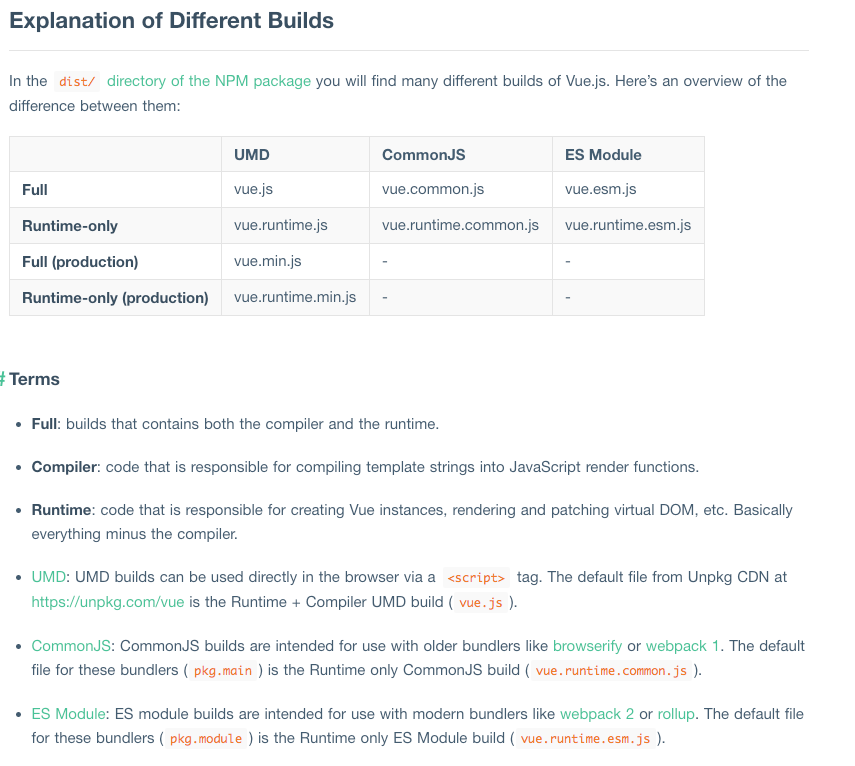
rollup
对应vue生成的dist目录下的文件vue.common.js,vue.esm.js, vue.js等内容。在package.json的scripts中设定了TARGET的值,在build/config.js 文件中可以看到,target对应的builds的值,vue.js文件对应的入口文件为src/entries/web-runtime-with-compiler.js,那么除了这个之外还有其他的对应的入口文件如web-runtime.js,这个不同的入口在后续阅读代码的时候会看到还是有一些不同的地方的。

###4.TypeScript *
官网:http://www.typescriptlang.org/index.html
TypeScript(以下简称TS)是JavaScript的超集,由微软开发,它类似于coffescript,旨在提高写JS的效率,增加了一些特性如静态语法检查等,它的文件后缀为ts, ts文件可以编译为js文件。
在vue项目,主要是用TS写了一个小型的测试,文件主要都在types目录下。其中test/tsconfig.json是TS的配置文件,可以简单看下,这块内容相对独立。

###5.ESLint *
了解的人应该比较多,主要是用来做一些简单的语法检查和统一代码风格。
网址:https://github.com/eslint/eslint
vue项目中只有在lint命令下可以看到只检查了 src, build 和test 目录,用处主要是在npm run test 以及build/git-hooks里设置,即当你提交vue的代码时,会设定检查eslint,通常情况用不到。

##三、其他

阅读源码之前,有必要对Vue的用法有个大致的了解,最好有些使用经验。在了解了作者对外暴露的接口之后,再去阅读接口背后的逻辑和作者的思路才能事半功倍。否则直接源码,对组件声明过程中各类触发的事件,Vue上挂载的函数,组件内可调用的函数都是抓瞎状态,读起来更容易找不到方向。


坚持原创技术分享,您的支持将鼓励我继续创作!